Shipped product case study
LawnGuide: AI Lawn Care Planner
A mobile-first PWA that turns a ZIP code and grass quiz into a hyper-local, week-by-week lawn care plan sourced from university extension PDFs — then runs a 25-story UX remediation sprint to make it credible enough for Facebook traffic.
Status
Shipped June 16, 2026
Scope
25 completed PRD tickets
Role
Product strategy, UX design, AI prompt engineering, and engineering
Product summary
From ZIP code to a week-by-week lawn plan in under 3 minutes
Most lawn care content is generic blog advice. LawnGuide replaces it with a hyper-local plan: enter your ZIP, identify your grass through a photo quiz, and the app silently fetches and parses your state's university extension PDF using Claude AI to generate a 52-week care calendar.
After shipping the core product, a 25-story UX remediation sprint addressed the gap between a working demo and a product credible enough for Facebook ad traffic: empty plan prevention, a readable dark Clerk auth theme, plain-English onboarding copy, transparent quantity math, and Playwright-verified responsive layouts across 7 viewports.
Shipped outcomes
- 52-week AI-generated care plan from university extension PDFs, cached by state and grass type
- 6-step adaptive onboarding with grass identification quiz, photo confirmation, and treatment history
- Responsive annual calendar (grid on desktop, list on mobile) with 7-viewport Playwright coverage
- 25-story UX remediation: empty-plan prevention, Clerk dark theme, plain-language copy, quantity math
- Full E2E test suite: 47 unit tests and 40+ Playwright tests across calendar, profile, onboarding, and auth
User flow
From ZIP code to weekly tasks
The journey is linear through 6 onboarding steps, then branches at the dashboard into the weekly plan and annual calendar.
- 01
Enter ZIP code
Resolves to USDA growing zone and US state. Validates 5-digit format and blocks continue until a real ZIP is found.
- 02
Grass identification quiz
Five questions (blade width, texture, color, growth pattern, season) score against 10 grass types to produce ranked candidates.
- 03
Photo confirmation
Top grass candidates shown with close-up photos and identifying traits. User confirms or browses the full list.
- 04
Yard conditions
Collects lawn size (sq ft), pets or livestock present, and sun exposure (6+ hours, 3–6 hours, under 3 hours) to personalize quantities and precautions.
- 05
Treatment history
Multi-select of treatments applied this season in plain English. 'None — I'm just getting started' prominently at top.
- 06
Plan ready
Completion screen: 'Your lawn plan is ready' with profile summary (location, grass, size), storage note, and dashboard CTA.
- 07
Dashboard: This week
AI-generated tasks for the current ISO week with priority labels, quantity calculations, and an 'Edit lawn details' escape hatch.
- 08
Annual calendar
All 12 months in a responsive CSS grid. Mobile defaults to list view. Empty months show plain-language copy, not dashes.
Product screenshots
UI at key moments in the flow
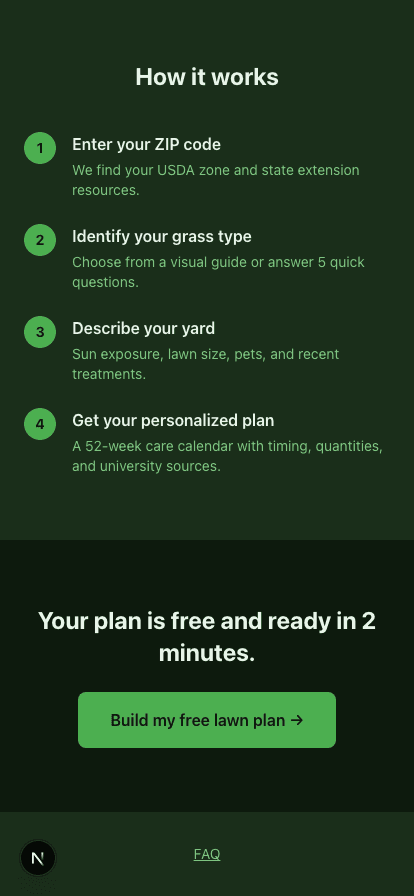
Landing page — mobile 414px
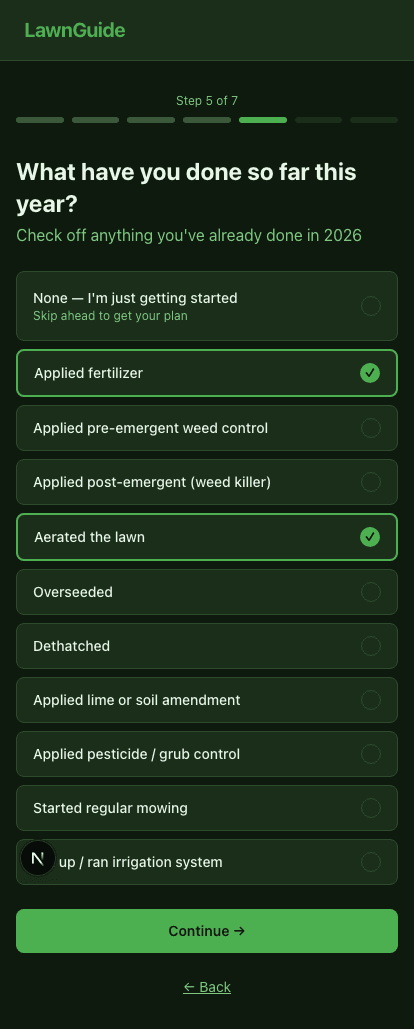
Treatment history step — mobile 414px
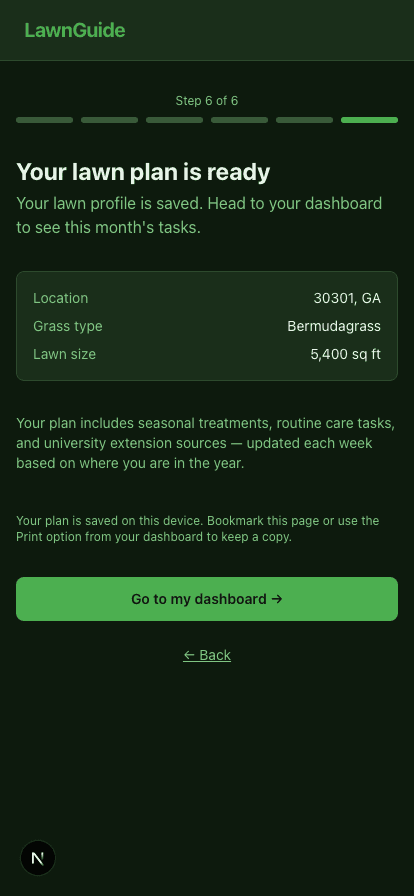
Onboarding completion — mobile 414px
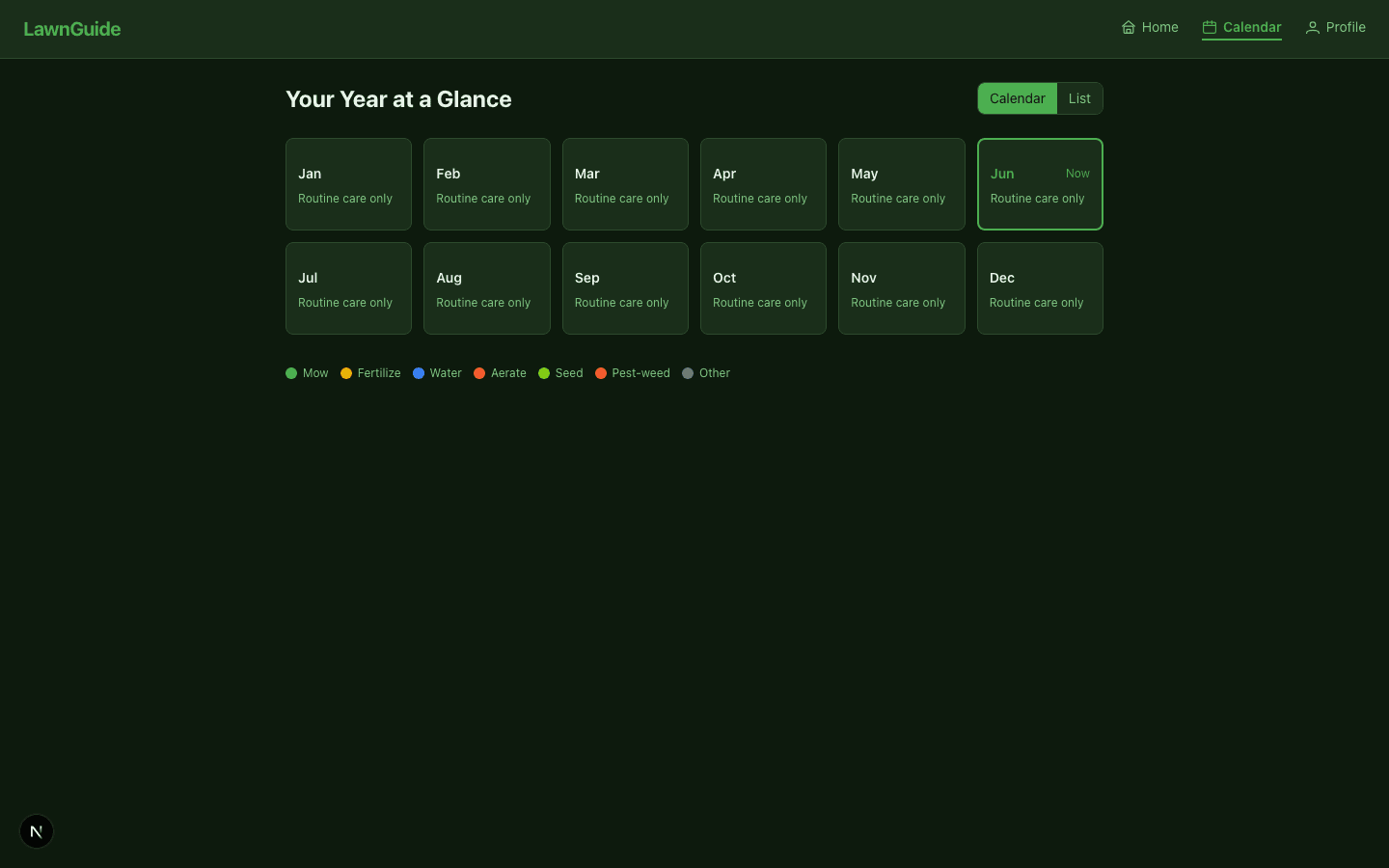
Annual calendar — desktop 1440px
PRD ticket ledger
All 23 shipped tickets
The product shipped in two waves: a core feature build from the original PRD, then a 25-story UX remediation sprint targeting Facebook traffic credibility — empty plan prevention, responsive layouts, accessible auth, and plain-language copy throughout.
Plan Reliability & Data Integrity
The first stories prevented the worst failure mode: completing onboarding and arriving at a dashboard that showed nothing. This phase fixed ISO week numbering in the AI system prompt, added plan validation that rejects empty arrays from Claude, and blocked destructive profile saves.
- US-001Shipped
Profile save validation
Added isValidZip(), touched-field error states, and a disabled Save button that only activates when required fields are valid — preventing blank overwrites of a working plan.
- US-002Shipped
Fix plan generation reliability
Diagnosed 5 root causes: ISO 8601 week spec missing from system prompt, empty [] treated as success, grass type not normalized before cache lookup, dashboard swallowing fetch errors silently, and quiet-week copy not derived from real plan data.
- US-002pShipped
Plan validation and retry UX
Centralized plan validation (rejects empty arrays, duplicate weeks, all-empty-task plans) into week-utils.ts. Added retry UX that preserves prior valid tasks and shows non-destructive dismissible error banners. 47 unit tests, no live services.
Responsive Layout & Calendar UX
The annual calendar shipped as a horizontal scroll strip — invisible on mobile and broken on narrow desktop. This phase replaced it with a responsive CSS grid, added 7-viewport Playwright coverage, and changed empty months from dashes to plain-language copy.
- US-003Shipped
Replace scrolling calendar with responsive grid
Replaced overflow-x-auto + flex with CSS grid (up to 6 columns). Added 'Now' text label on current month, focus-visible ring, and ▾ expansion indicator. 7 Playwright viewport tests (320–1920px) all pass.
- US-004Shipped
Replace empty-state dashes with useful copy
Calendar month cards now show 'Routine care only' instead of '—'. Expanded month panels show 'No seasonal treatments this month. Continue regular mowing and watering.' instead of the generic empty message.
- US-005Shipped
Mobile defaults to list view
viewMode defaults to 'list' below 768px and 'calendar' above, but only on first load. Choice persists to localStorage. E2E tests verify default per breakpoint and localStorage persistence across reload.
Auth & Dark Theme Design System
The Clerk sign-in and sign-up pages showed near-black text on the dark green card — unreadable. Rather than guess Clerk's appearance API from training data, I wrote a TypeScript Compiler API script to enumerate the real variable shape from node_modules, then applied all 24 color variables and matching element overrides.
- US-CLERKShipped
Fix Clerk dark theme on sign-in and sign-up
Shared clerkAppearance object exported from src/lib/clerk-appearance.ts maps all 24 Clerk variables and key element overrides to LawnGuide CSS tokens. 14 Playwright tests (5 viewports × 2 routes + card visibility + keyboard focus). All 14 pass.
Onboarding Flow Improvements
Five stories simplified and humanized the onboarding: a 'just getting started' escape at the top of treatment history, visible checkmarks on every selectable row, removal of the placeholder extension resources step (7→6 steps), a redesigned completion screen, and plain-English treatment labels.
- US-011Shipped
Add 'None — I'm just getting started' at top
Moved the none-selected option from the bottom of the treatment history to the top with a 'Skip ahead to get your plan' subtitle. Taller tap target (py-4 vs py-3) to signal it as the primary escape.
- US-012Shipped
Add visible checkmark indicators
Every selectable row shows a filled green circle with checkmark when selected, empty bordered circle otherwise. Trailing indicator pinned with ml-auto so stacked label+subtitle text has room to breathe.
- US-013Shipped
Remove extension resources step
Step 6 (a full wizard screen with one generic external link) removed. STEP_COMPONENTS now [Step1–Step5, Step7]. TOTAL_STEPS reduced from 7 to 6 in layout.tsx.
- US-014Shipped
Redesign completion screen
'You're all set!' replaced with 'Your lawn plan is ready' + profile summary card (location, grass name, lawn size if provided) + device-storage note. Existing dashboard CTA unchanged.
- US-024Shipped
Rewrite treatment history in plain English
All TASKS labels rewritten to plain English while preserving every existing id value so stored history remains compatible. Example: 'Applied pre-emergent weed control' → 'Used a product to prevent weeds before they sprout'.
Landing Page & Trust Signals
Five stories improved the public landing page and its credibility for Facebook traffic: a concrete hero headline, university-extension trust language replacing 'science-backed', an accurate How-it-works step count, a native FAQ page, and Open Graph metadata.
- US-006Shipped
Rewrite hero copy
Hero h1 changed to 'A lawn-care plan for your grass and your location'. CTA label changed to 'Build my free lawn plan →' (shared CtaButton component — one edit covers hero and bottom CTA).
- US-007Shipped
Replace 'science-backed' with extension language
Zone-aware feature card updated to 'Plans calibrated to your USDA growing zone and based on university extension guidance for your region.' Verified no other 'science-backed' occurrences remain.
- US-008Shipped
Align How-it-works to actual onboarding
HOW_IT_WORKS array updated from 3 generic steps to 4 onboarding-accurate steps: ZIP code, grass type, yard description, personalized plan. Rendered via .map() — no markup changes needed.
- US-015Shipped
Add FAQ page and footer link
Created /faq as a server component using native <details>/<summary> for 8 common questions — no client JS. Added minimal footer to landing page with /faq link (first footer in the app).
- US-018Shipped
Add Open Graph metadata
Full OG/Twitter/canonical metadata in src/app/metadata.ts, re-exported from layout.tsx. 1200×630 og-image.png placeholder in public/. metadataBase uses NEXT_PUBLIC_APP_URL with production fallback.
Profile, Dashboard & UX Polish
Six stories tightened the data-entry experience and made the dashboard more actionable: a text input replaced the number spinner for lawn size, sunlight labels were standardized between onboarding and profile, global type was scaled up, task priority labels added plain-language timing, and quantity math was made transparent.
- US-009Shipped
Replace lawn size number spinner
type=number replaced with type=text + inputMode=numeric. Non-digit characters stripped on change. Values under 100 sq ft show inline error. Placeholder 'e.g. 5,000'. E2E: e2e/profile.spec.ts.
- US-010Shipped
Standardize sunlight options
Profile sunlight buttons now show the same hour-range descriptions used in onboarding ('6+ hours direct sun', '3–6 hours', 'Under 3 hours'). Selected label color flips to background for contrast.
- US-019Shipped
Scale up global typography
Body font-size increased from 1rem to 1.0625rem (17px), line-height to 1.55. Dashboard task descriptions, calendar task rows, and profile field labels updated. Verified via Playwright computed-style check.
- US-020Shipped
Add plain-language priority labels
Task cards now show text labels before the title row: 'Due this week' (urgent), 'Routine care' (routine), 'Optional'. Calendar priority pill badges replaced with text-only uppercase labels.
- US-022Shipped
Transparent quantity calculations
formatQuantityBreakdown() produces a separate calc note below task description: 'Calculation: X lbs per 1,000 sq ft × Y sq ft = Z lbs total'. Task description sentence unchanged. Regex matches lbs-per-1,000 pattern.
- US-023Shipped
Add 'Edit lawn details' link on dashboard
Link to /profile added below the grass/state/week subtitle. Only renders when a profile is loaded (grassName truthy), so it never shows on the onboarding gate.